React, RangeAPI로 텍스트 폰트 변경 기능 구현하기
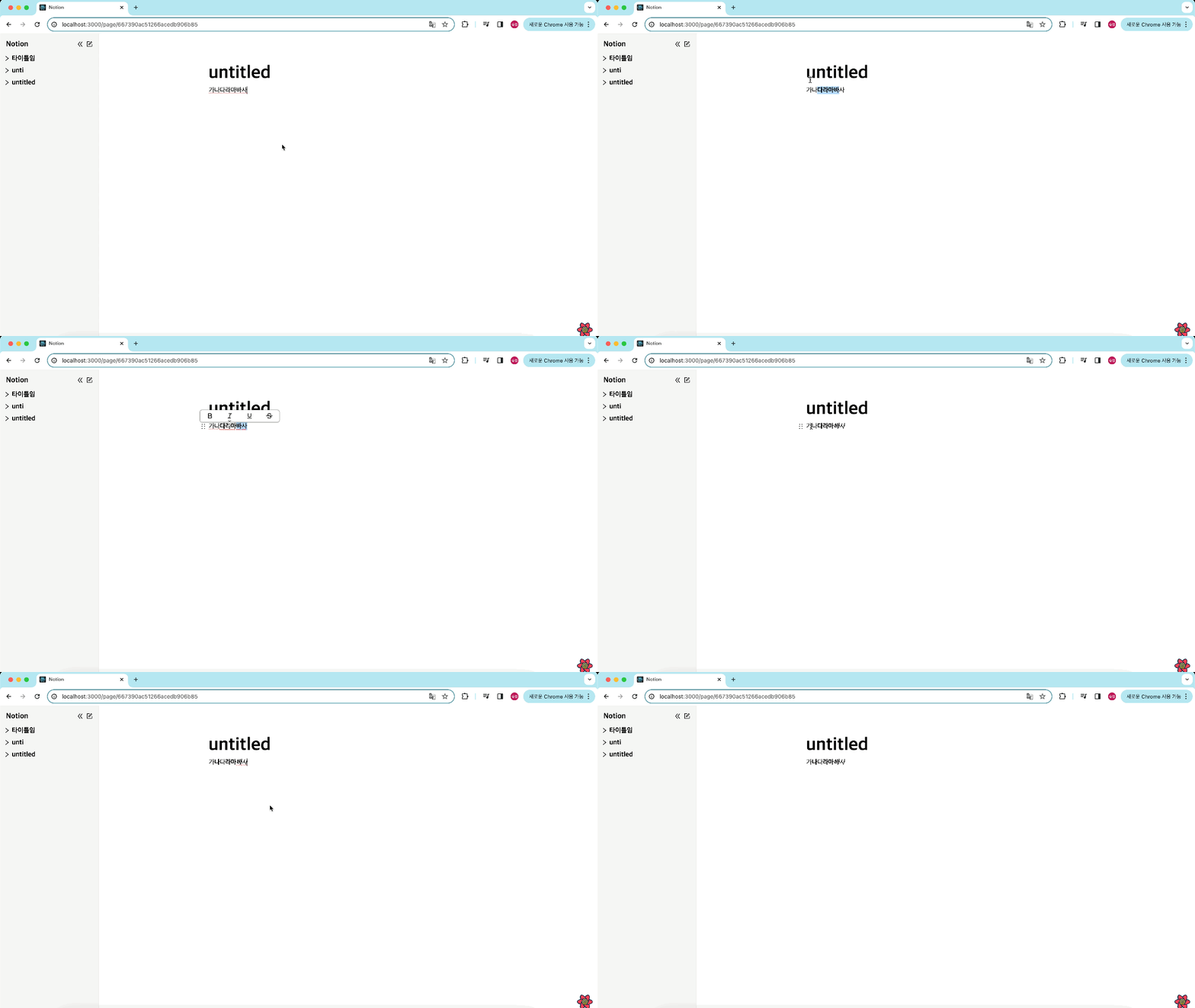
- notion 클론 프로젝트에서 텍스트 드래그 시 텍스트 변경 박스가 나타나고 변경하고자 하는 폰트를 클릭하면 선택한 부분만 폰트가 바뀌는 기능을 구현한 과정을 기제해보려한다.
구현하고자 하는 기능
- 먼저 노션을 분석해보자
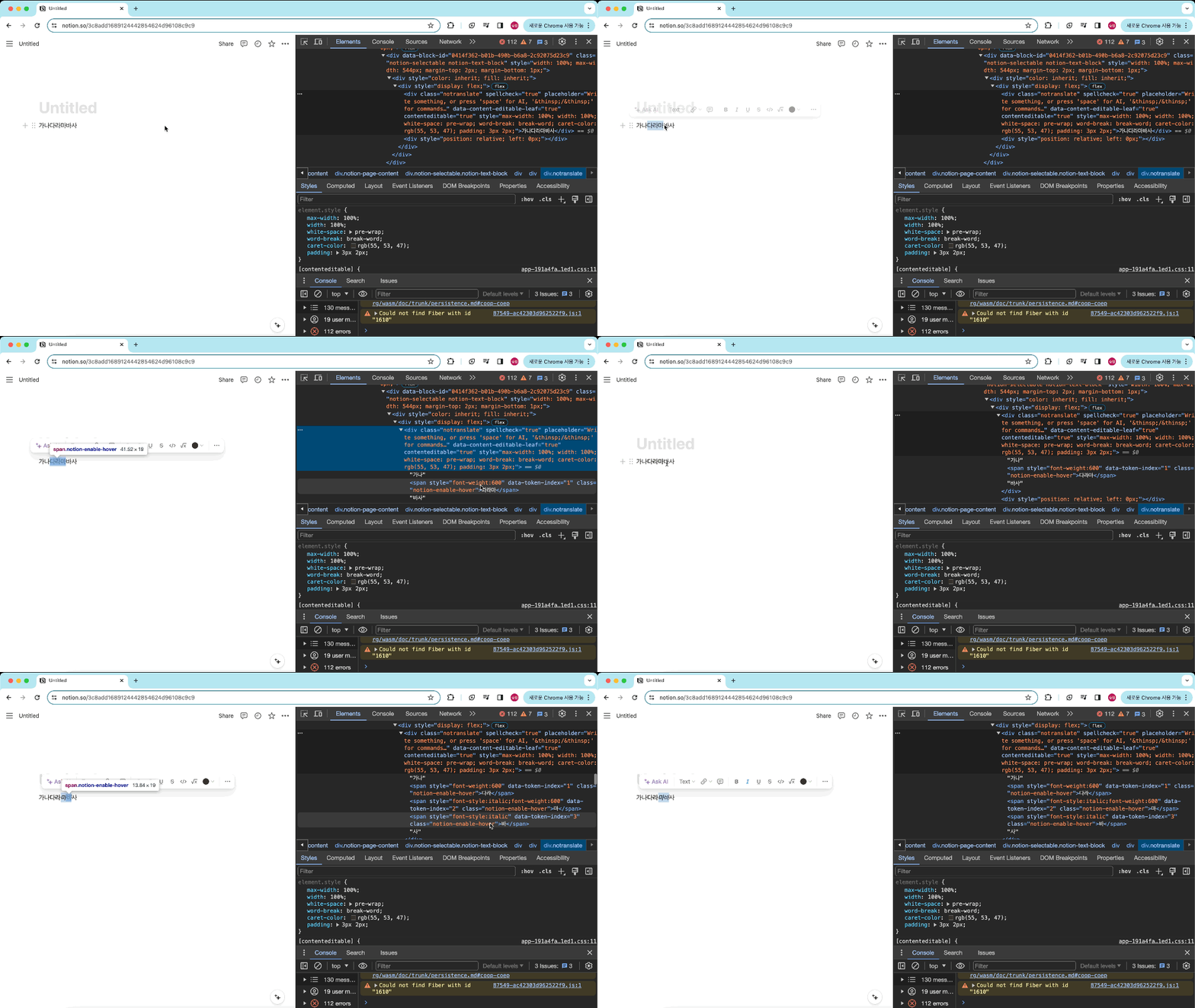
- 텍스트 드래그 시 변경 박스 생성
- 변경하고자 하는 폰트 클릭 시 span에 스타일 적용 후 분리
- 각자 다른 span에 텍스트가 있을 때 텍스트 제거 후 span으로 분리
폰트 드래그 시 폰트 변경 박스 생성
- 텍스트를 드래그할 때 폰트 변경 박스를 생성하는 방법을 구현하기 위해 다음과 같은 접근 방식을 사용했다.
드래그한 텍스트 감지
- 텍스트를 드래그한 후, mouseUp 이벤트가 발생했을 때 selection.toString() 메서드를 사용하여 선택된 텍스트가 빈 문자열이 아닌지 확인하고, 빈 문자열이 아닐 경우에만 폰트 변경 박스를 표시하도록 했다.
import React, { useEffect, useRef, useState } from "react";
import { DraggableProvidedDragHandleProps } from "@hello-pangea/dnd";
import restoreCaretPosition from "../../../utils/restoreCaretPosition";
import saveCaretPosition from "../../../utils/saveCaretPosition";
import DropdownBox from "./DropdownBox/DropdownBox";
import * as S from "../../../styles/BlockStyle";
import TextSwitcherBox from "./TextSwitcherBox/TextSwitcherBox";

interface BlockEditorProps {
    index: number;
    id: string | undefined;
    type: string;
    content: string;
    handleContentChange: (index: number, newContent: string) => void;
    handleTagChange: (index: number, newType: string) => void;
    handleKeyDown: (
        e: React.KeyboardEvent<HTMLDivElement>,
        index: number
    ) => void;
    dragHandleProps: DraggableProvidedDragHandleProps | null;
}

const BlockEditable = ({
    index,
    id,
    type,
    content,
    handleContentChange,
    handleTagChange,
    handleKeyDown,
    dragHandleProps,
}: BlockEditorProps) => {

    const [isDropdownOpen, setDropdownOpen] = useState(false);
    const [isTextSwitcher, setIsTextSwitcher] = useState(false);
    const [isFocus, setFocus] = useState(false);
    const dropDownRef = useRef<HTMLDivElement>(null);
    const caretPositionRef = useRef<{
        startContainer: Node;
        startOffset: number;
        endContainer: Node;
        endOffset: number;
    } | null>(null);

    const handleInput = (e: React.FormEvent<HTMLDivElement>) => {
        saveCaretPosition(caretPositionRef);
        const newContent = (e.currentTarget as HTMLDivElement).textContent ?? "";
        handleContentChange(index, newContent);
        if (newContent === "/" && isFocus) {
            setDropdownOpen(true);
        } else {
            setDropdownOpen(false);
        }
    };
    // 마우스업 이벤트 함수
    const handleMouseUp = () => {
        const selection = window.getSelection();
        const selectText = selection?.toString();
        if (selectText !== "" && isFocus) return setIsTextSwitcher(true);
        return setIsTextSwitcher(false);
    };

    useEffect(() => {
        const selection = window.getSelection();
        selection?.removeAllRanges();
        caretPositionRef.current = null;
    }, [id]);

    useEffect(() => {
        if (content !== "") restoreCaretPosition(caretPositionRef);
    }, [content]);

    useEffect(() => {
        if (isDropdownOpen) {
            dropDownRef.current?.focus();
        }
    }, [isDropdownOpen, isFocus]);

    return (
        <S.BlockContainer>
            <S.DragHandle {...dragHandleProps} />
            <S.Block
                as={type}
                data-position={index}
                contentEditable
                suppressContentEditableWarning={true}
                aria-placeholder="글을 작성하려면 '스페이스'키를, 명령어를 사용하려면 '/'키를 누르세요."
                onInput={handleInput}
                onKeyDown={(e) => handleKeyDown(e, index)}
                onFocus={() => setFocus(true)}
                onBlur={() => setFocus(false)}
                onMouseUp={handleMouseUp}
                $isFocus={isFocus}
            >
            { content }
            </S.Block>
            {isDropdownOpen && (
                <DropdownBox
                    handleTagChange={handleTagChange}
                    index={index}
                    ref={dropDownRef}
                    setDropdownOpen={setDropdownOpen}
                />
            )}
            // 드래그시 생성 컴포넌트
            {isTextSwitcher && (
                <TextSwitcherBox
                    setIsTextSwitcher={setIsTextSwitcher}
                    index={index}
                    handleContentChange={handleContentChange}
                    blockRef={blockRef}
                />
            )}
        </S.BlockContainer>
    );
};

export default BlockEditable;
1차 구현(Range: surroundContents 사용)
- range.surroundContents를 사용하는 접근 방식을 사용해보기로했다.
- surroundContents는 mdn 공식 문서에 다음과 같이 정의하고 있다.
Range.surroundContents() 메서드는 범위의 콘텐츠를 새 노드로 이동하여 새 노드를 지정된 범위의 시작 부분에 배치합니다.
-
무슨 말인지 모르겠다..직접 구현해보니 사용자가 선택한 부분을 createElement로 만든 태그로 감싸주는 거였다.
-
공식 문서의 예제를 참고해 구현해보았다.
- selection.getRangeAt()로 사용자가 선택한 부분을 가져온다.
- document.createElement("span")으로 새로운 태그를 만들어 선택한 스타일을 적용
- range.surroundContents(span)로 선택부분에 스타일이 적용된 span으로 감싼다.
import React, { useRef } from 'react'
import styled from "styled-components";
import { BoldOutlined, ItalicOutlined, UnderlineOutlined, StrikethroughOutlined } from '@ant-design/icons';
import useOnClickOutside from '../../../../hooks/useOnClickOutSide';

const FONT_LIST = [
    { type: <BoldOutlined/>, tag: "bold" },
    { type: <ItalicOutlined/>, tag: "italic" },
    { type: <UnderlineOutlined/>, tag: "underline" },
    { type: <StrikethroughOutlined/>, tag: "line-through" }
]

interface TextSwitcherProps {
    setIsTextSwitcher: React.Dispatch<React.SetStateAction<boolean>>
}

const TextSwitcherBox = ({setIsTextSwitcher}: TextSwitcherProps) => {

    const textSwitcherRef = useRef<HTMLDivElement>(null)
    useOnClickOutside(textSwitcherRef, setIsTextSwitcher)

    const applyStyle = (style: string) => {
        const selection = window.getSelection();
        if (!selection?.rangeCount) return;
        // 사용자가 선택한 부분을 가져온다.
        const range = selection.getRangeAt(0);
        // 새로운 태그 생성 후 스타일 적용
        const span = document.createElement('span');
        span.style.fontWeight = style === 'bold' ? 'bold' : 'normal';
        span.style.fontStyle = style === 'italic' ? 'italic' : 'normal';
        span.style.textDecoration = style === 'underline' ? 'underline' : (style === 'line-through' ? 'line-through' : 'none');
        // 선택부분에 스타일이 적용된 span으로 감싼다
        range.surroundContents(span);
        // 스타일 적용 후 TextSwitcher를 닫는다.
        setIsTextSwitcher(false)
    };

    return (
        <TextSwitcherContainer ref={textSwitcherRef}>
        {FONT_LIST.map((item, idx) => (
            <TextItem key={idx} onClick={()=>applyStyle(item.tag)}>{item.type}</TextItem>
        ))}
    </TextSwitcherContainer>
    )
}

export default TextSwitcherBox
문제 상황
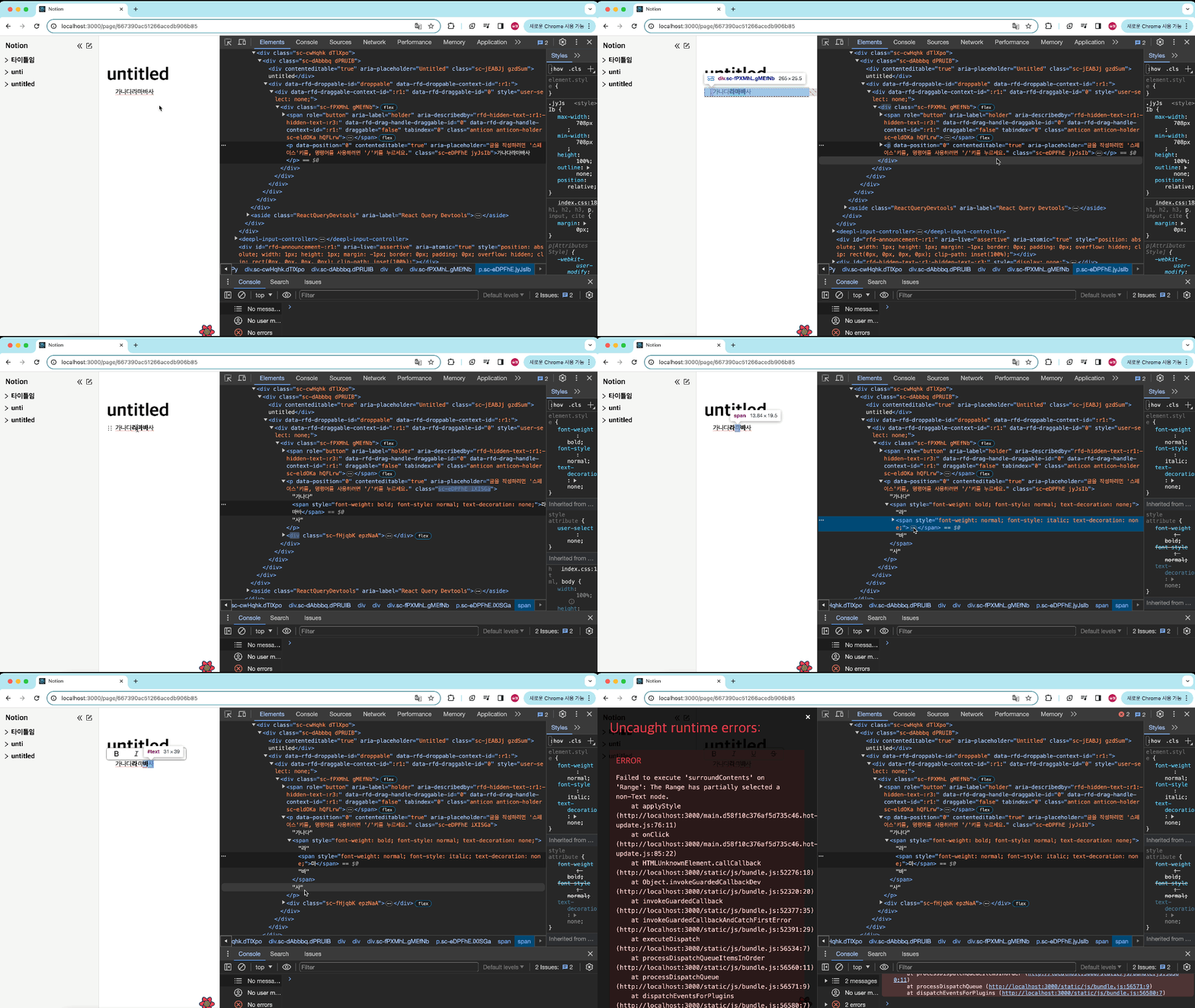
- 이미 span이 적용된 부분에 다른 스타일을 적용할 경우 이미 있는 span에 스타일이 적용되는것이 아닌 span이 중첩되어 스타일이 적용된다.
- 서로 다른 태그를 드래그로 선택하면 이 둘을 다른 태그로 감쌀 수 없기 때문에 에러가 난다.
2차 구현
- surroundContents 메소드는 같은 태그 안에서만 사용할 수 있고 계속 중첩이 일어나 다른 방법을 사용하기로 했다.
- 먼저 Range의 메소드를 찾아보고 설계부터 다시 해보자.
Range 메소드 및 설계(cloneContents, deleteContents, insertNode)
- Range 메소드를 찾아보니 유용하게 사용할 수 있는 메소드가 있어 이를 토대로 다시 설계 해보았다.
- cloneContents: Range.cloneContents()는 Range에 포함된 노드 타입의 객체를 복사하는 DocumentFragment를 반환합니다.
- deleteContents: Range.deleteContents() 메서드는 문서에서 범위의 내용을 제거합니다(텍스트만 제거).
- insertNode: Range.insertNode() 메서드는 범위의 시작 부분에 노드를 삽입합니다.
노드 탐색
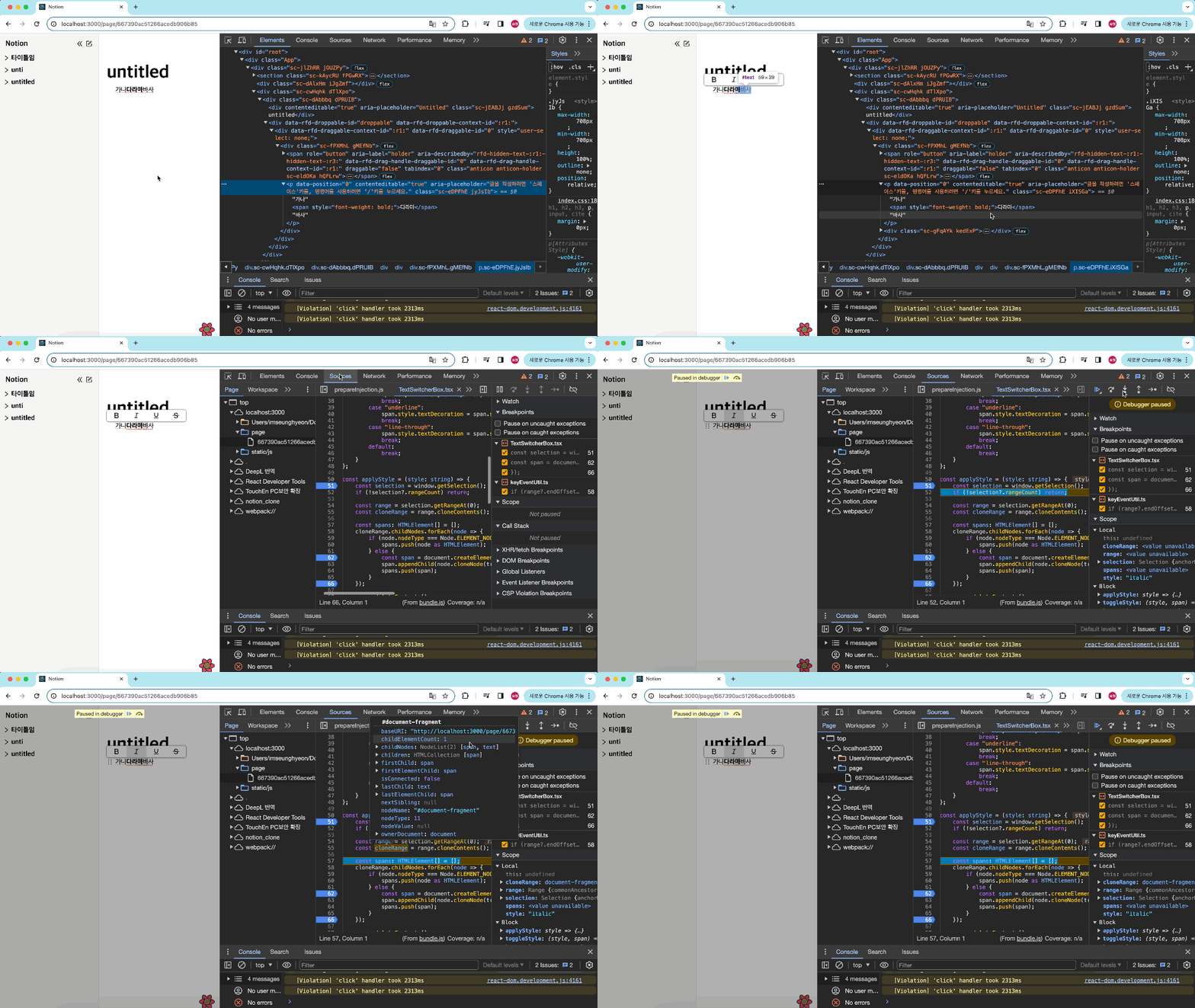
- 선택된 부분의 Range 다시 보니 여러 태그에서 텍스트를 드래그로 선택했을때 childNodes에 선택된 부분의 노드를 모두 담고 있었고, 각 노드는 그 노드의 텍스트를 포함하고 있다.
설계
- 선택 영역을 가져온다:
- 선택된 텍스트의 범위를 가져와 cloneContents()를 사용하여 선택된 내용을 복사한다.
- 복제된 범위의 childNodes를 순회하면서 각 노드의 타입을 확인한다.
- 만약 노드가 ELEMENT_NODE 타입이라면, 해당 노드를 배열에 추가한다.
- ELEMENT_NODE가 아닌 경우, 새로운 span 태그를 생성하고 해당 노드를 복제하여 span에 추가한 후 배열에 추가한다.
- 원래 선택된 범위의 내용을 삭제한다.
- 스타일 적용 후 삽입한다.
const applyStyle = (style: string) => {
    const selection = window.getSelection();
    if (!selection?.rangeCount) return;

    const range = selection.getRangeAt(0);
    const cloneRange = range.cloneContents();

    const spans: HTMLElement[] = [];
    cloneRange.childNodes.forEach(node => {
        if (node.nodeType === Node.ELEMENT_NODE) {
            spans.push(node as HTMLElement);
        } else {
            const span = document.createElement('span');
            span.appendChild(node.cloneNode(true));
            spans.push(span);
        }
    });

    range.deleteContents();

    spans.forEach(span => {
        toggleStyle(style, span);
        range.insertNode(span);
    });

    setIsTextSwitcher(false);
};
문제 상황
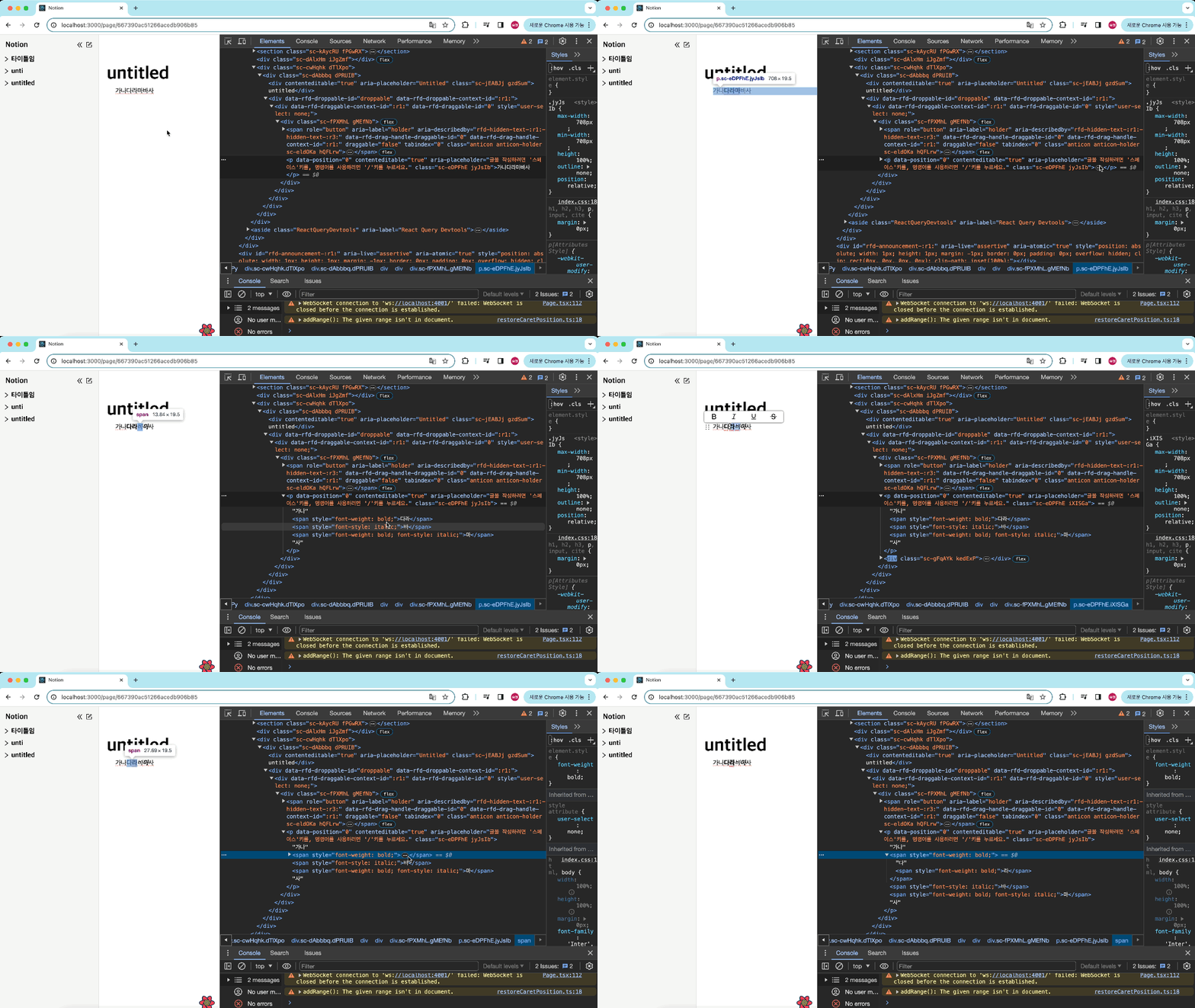
- 서로 다른 태그를 선택해 폰트를 변경했을때 구현 1 과 같은 에러는 나지 않고 분리되어 삽입되지만 선택한 텍스트위 앞뒤가 바뀐다(서로 다른 태그의 '가나'를 선택해 폰트를 변경하면 '나가'로 바뀌어 들어간다)
- 이미 적용된 폰트를 다시한번 선택하거나 다른 폰트를 적용할 때 span이 중첩된다.
디버깅
-
디버깅을 해보니, 위에서는 각 노드를 순회하면서 span 태그를 생성하고 이를 spans 배열에 추가했다. 그런 다음 spans 배열을 순회하면서 insertNode를 사용하여 노드를 삽입했더니, 선택된 범위의 startOffset 기준으로 삽입되어 원래 노드의 순서가 뒤바뀌는 문제가 발생했던거였다.
- 해결방안: 가상의 노드를 미리 만들어 가상의 노드에 appendChild로 spans를 모두 넣고 range.insertNode(가상노드)로 한번에 넣어주는 방법을 고안했다.
-
2번 문제는 node.nodeType === Node.ELEMENT_NODE 조건은 div, span, p 등과 같은 요소 노드를 의미한다. 하지만 선택된 텍스트가 실제 텍스트 노드인 경우, 이는 TEXT_NODE로 판단되어 else 문으로 이동하고 있었다.
- 해결방안: Node.TEXT_NODE를 Node.ELEMENT_NODE와 함께 처리할 수 있도록 코드를 수정, 선택된 텍스트가 SPAN 요소 내에 있을 경우, 부모 노드를 확인하여 스타일을 적용하거나 제거, 클론된 노드가 ELEMENT_NODE일 경우와 TEXT_NODE일 경우를 각각 처리하여 스타일을 적용한다.
const applyStyle = (style: string) => {
        const selection = window.getSelection();
        if (!selection?.rangeCount) return;

        const range = selection.getRangeAt(0);
        const { startContainer, endContainer } = range;

        if (
            startContainer.parentNode === endContainer.parentNode &&
            startContainer.nodeType === Node.TEXT_NODE &&
            startContainer.parentElement?.tagName === "SPAN"
        ) {
            const parent = startContainer.parentNode as HTMLElement;
            toggleStyle(style, parent);
            return;
        }

        const fragment = document.createDocumentFragment();
        const cloneRange = range.cloneContents();

        cloneRange.childNodes.forEach((node) => {
            if (node.nodeType === Node.ELEMENT_NODE) {
                toggleStyle(style, node as HTMLElement);
                fragment.appendChild(node.cloneNode(true));
            } else {
                const span = document.createElement("span");
                span.appendChild(node.cloneNode(true));
                toggleStyle(style, span);
                fragment.appendChild(span);
            }
        });

        range.deleteContents();
        range.insertNode(fragment);
        setIsTextSwitcher(false);
    };
서버에 저장 및 html text를 렌더하기
- 블럭에 ref를 할당하고 ref.innerHTML 자체를 가져와 서버에 저장한다.
- HTML text를 서버에 저장하고 그냥 렌더할 경우
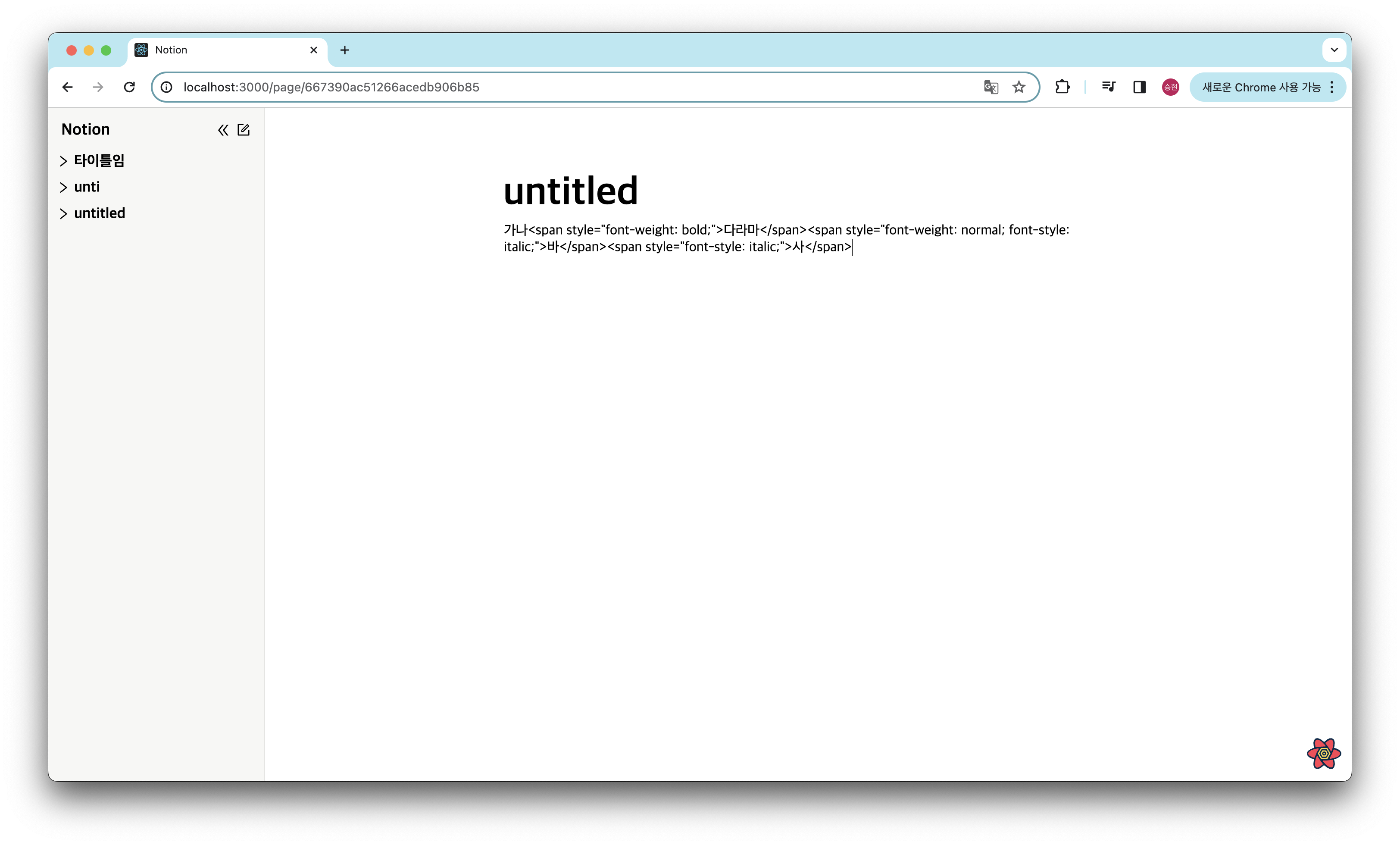
위에처럼 문자 자체가 렌더링 되기 때문에 dangerouslySetInnerHTML 속성을 사용해 렌더한다.
최종 코드
// BlockEditable.tsx

import React, { useEffect, useRef, useState } from "react";
import { DraggableProvidedDragHandleProps } from "@hello-pangea/dnd";
import restoreCaretPosition from "../../../utils/restoreCaretPosition";
import saveCaretPosition from "../../../utils/saveCaretPosition";
import DropdownBox from "./DropdownBox/DropdownBox";
import * as S from "../../../styles/BlockStyle";
import TextSwitcherBox from "./TextSwitcherBox/TextSwitcherBox";

interface BlockEditorProps {
    index: number;
    id: string | undefined;
    type: string;
    content: string;
    handleContentChange: (index: number, newContent: string) => void;
    handleTagChange: (index: number, newType: string) => void;
    handleKeyDown: (
        e: React.KeyboardEvent<HTMLDivElement>,
        index: number
    ) => void;
    dragHandleProps: DraggableProvidedDragHandleProps | null;
}

const BlockEditable = ({
    index,
    id,
    type,
    content,
    handleContentChange,
    handleTagChange,
    handleKeyDown,
    dragHandleProps,
}: BlockEditorProps) => {

    const [isDropdownOpen, setDropdownOpen] = useState(false);
    const [isTextSwitcher, setIsTextSwitcher] = useState(false);
    const [isFocus, setFocus] = useState(false);
    const dropDownRef = useRef<HTMLDivElement>(null);
    const blockRef = useRef<HTMLDivElement>(null);
    const caretPositionRef = useRef<{
        startContainer: Node;
        startOffset: number;
        endContainer: Node;
        endOffset: number;
    } | null>(null);

    const handleInput = (e: React.FormEvent<HTMLDivElement>) => {
        saveCaretPosition(caretPositionRef);
        const newContent = (e.currentTarget as HTMLDivElement).textContent ?? "";
        handleContentChange(index, newContent);
        if (newContent === "/" && isFocus) {
            setDropdownOpen(true);
        } else {
            setDropdownOpen(false);
        }
    };

    const handleMouseUp = () => {
        const selection = window.getSelection();
        const selectText = selection?.toString();
        if (selectText !== "" && isFocus) return setIsTextSwitcher(true);
        return setIsTextSwitcher(false);
    };

    useEffect(() => {
        const selection = window.getSelection();
        selection?.removeAllRanges();
        caretPositionRef.current = null;
    }, [id]);

    useEffect(() => {
        if (content !== "") restoreCaretPosition(caretPositionRef);
    }, [content]);

    useEffect(() => {
        if (isDropdownOpen) {
            dropDownRef.current?.focus();
        }
    }, [isDropdownOpen, isFocus]);

    return (
        <S.BlockContainer>
            <S.DragHandle {...dragHandleProps} />
            <S.Block
                as={type}
                data-position={index}
                contentEditable
                suppressContentEditableWarning={true}
                aria-placeholder="글을 작성하려면 '스페이스'키를, 명령어를 사용하려면 '/'키를 누르세요."
                onInput={handleInput}
                onKeyDown={(e) => handleKeyDown(e, index)}
                onFocus={() => setFocus(true)}
                onBlur={() => setFocus(false)}
                onMouseUp={handleMouseUp}
                ref={blockRef}
                $isFocus={isFocus}
                dangerouslySetInnerHTML={{ __html: content }}
            >
            </S.Block>
            {isDropdownOpen && (
                <DropdownBox
                    handleTagChange={handleTagChange}
                    index={index}
                    ref={dropDownRef}
                    setDropdownOpen={setDropdownOpen}
                />
            )}
            {isTextSwitcher && (
                <TextSwitcherBox
                    setIsTextSwitcher={setIsTextSwitcher}
                    index={index}
                    handleContentChange={handleContentChange}
                    blockRef={blockRef}
                />
            )}
        </S.BlockContainer>
    );
};

export default BlockEditable;
// TextSwitcherBox.tsx

import React, { useRef } from "react";
import {
    BoldOutlined,
    ItalicOutlined,
    UnderlineOutlined,
    StrikethroughOutlined,
} from "@ant-design/icons";
import useOnClickOutside from "../../../../hooks/useOnClickOutSide";
import * as S from "../../../../styles/TextSwitcherBoxStyle"

const FONT_LIST = [
    { type: <BoldOutlined />, tag: "bold" },
    { type: <ItalicOutlined />, tag: "italic" },
    { type: <UnderlineOutlined />, tag: "underline" },
    { type: <StrikethroughOutlined />, tag: "line-through" },
];

const toggleStyle = (style: string, span: HTMLElement) => {
    switch (style) {
        case "bold":
            span.style.fontWeight = span.style.fontWeight === "bold" ? "normal" : "bold";
            break;
        case "italic":
            span.style.fontStyle = span.style.fontStyle === "italic" ? "normal" : "italic";
            break;
        case "underline":
            span.style.textDecoration = span.style.textDecoration === "underline" ? "none" : "underline";
            break;
        case "line-through":
            span.style.textDecoration = span.style.textDecoration === "line-through" ? "none" : "line-through";
            break;
        default:
            break;
    }
};

interface TextSwitcherProps {
    setIsTextSwitcher: React.Dispatch<React.SetStateAction<boolean>>;
    index: number;
    handleContentChange: (index: number, newContent: string) => void;
    blockRef: React.RefObject<HTMLDivElement>;
}

const TextSwitcherBox = ({
    setIsTextSwitcher,
    index,
    handleContentChange,
    blockRef,
}: TextSwitcherProps) => {
    const textSwitcherRef = useRef<HTMLDivElement>(null);
    useOnClickOutside(textSwitcherRef, () => setIsTextSwitcher(false));

    const applyStyle = (style: string) => {
        const selection = window.getSelection();
        if (!selection?.rangeCount) return;

        const range = selection.getRangeAt(0);
        const { startContainer, endContainer } = range;

        if (
            startContainer.parentNode === endContainer.parentNode &&
            startContainer.nodeType === Node.TEXT_NODE &&
            startContainer.parentElement?.tagName === "SPAN"
        ) {
            const parent = startContainer.parentNode as HTMLElement;
            toggleStyle(style, parent);
            updateInnerHTML()
            return;
        }

        const fragment = document.createDocumentFragment();
        const cloneRange = range.cloneContents();

        cloneRange.childNodes.forEach((node) => {
            if (node.nodeType === Node.ELEMENT_NODE) {
                toggleStyle(style, node as HTMLElement);
                fragment.appendChild(node.cloneNode(true));
            } else {
                const span = document.createElement("span");
                span.appendChild(node.cloneNode(true));
                toggleStyle(style, span);
                fragment.appendChild(span);
            }
        });

        range.deleteContents();
        range.insertNode(fragment);
        updateInnerHTML()
    };

    const updateInnerHTML = () => {
        const innerHtml = blockRef.current?.innerHTML
            ? blockRef.current.innerHTML
            : "";
        handleContentChange(index, innerHtml);
        setIsTextSwitcher(false);
    }

    return (
        <S.TextSwitcherContainer ref={textSwitcherRef}>
            {FONT_LIST.map((item, idx) => (
                <S.TextItem key={idx} onClick={() => applyStyle(item.tag)}>
                    {item.type}
                </S.TextItem>
            ))}
        </S.TextSwitcherContainer>
    );
};

export default TextSwitcherBox;
결과