- 저번 포스트에 Vite, Typescript 환경에서 절대경로 설정하는 방법을 다뤘습니다.
- 이번 포스트에서는 import 순서를 설정하고 자동으로 유지하는 방법에 대해 작성하겠습니다.
import 순서를 설정해야 하는 이유
- 혼자 개발할 때는 큰 문제가 되지 않을 수도 있지만, 팀 프로젝트에서는 import 순서가 정해저 있지 않으면 머지 시 충돌이 발생할 수 있습니다. 또한 일관성이 부족하면 코드의 가독성과 유지보수성이 저하될 수 있습니다.
eslint-plugin-import install
- 다양한 plugin이 있지만, npmtrends에서 다운로드 수가 가장 많은 eslint-plugin-import를 사용했습니다.
- eslint-plugin-import는 ESlint의 플러그인 중 하나로, import 문을 분석하고 정리하는 역할을 합니다.
- 아래 명령어로 install 해줍니다.
npm install --save-dev eslint-plugin-import
- package.json의 “devDependencies”에 eslint-plugin-import가 추가 된 것을 확인하고, eslint.config.js에 ESlint가 해당 plugin을 인식할 수 있도록 추가합니다.
import js from '@eslint/js'
import globals from 'globals'
import reactHooks from 'eslint-plugin-react-hooks'
import reactRefresh from 'eslint-plugin-react-refresh'
import tseslint from 'typescript-eslint'
import importPlugin from 'eslint-plugin-import'
export default tseslint.config(
{ ignores: ['dist'] },
{
extends: [js.configs.recommended, ...tseslint.configs.recommended],
files: ['**/*.{ts,tsx}'],
languageOptions: {
ecmaVersion: 2020,
globals: globals.browser,
},
plugins: {
'react-hooks': reactHooks,
'react-refresh': reactRefresh,
import: importPlugin,
},
rules: {
...reactHooks.configs.recommended.rules,
'react-refresh/only-export-components': [
'warn',
{ allowConstantExport: true },
],
},
},
)
import 규칙 설정
"import/order": [
    "error",
    {
        groups: [
            "builtin",
            "external",
            "internal",
            ["sibling", "parent", "index"],
            "type",
            "unknown",
        ],
        "newlines-between": "always",
        alphabetize: { order: "asc", caseInsensitive: true },
    },
],
import/order 속성
- "error"
"import/order": ["error", {...}]
- "error" 규칙을 위반하면 ESLint에서 에러(Error)로 처리합니다.
- "warn"으로 변경하면 경고(Warning)로만 표시됩니다.
- "off"로 변경하면 해당 규칙을 적용하지 않습니다.
- groups (import 그룹화)
- builtin - node.js내의 모듈
- external - 외부 패키지 및 라이브러리
- internal - 프로젝트 내부의 모듈
- parent - 부모(상위) 디렉토리의 모듈
- sibling - 동일한 디렉토리의 모듈
- index - 현재 디렉토리의 index 파일
- object - console.log와 같이 내장 객체 import(typescript에서만 사용 가능)
- type - type 파일 (typescript에서만 사용 가능)
- unknown - 그 외에 인식 할 수 없는 타입의 모듈
- newlines-between": "always" (그룹 간 개행 유지)
import 그룹 간에 항상 개행(빈 줄)을 추가 하도록 합니다.
- "always" 설정하면 그룹마다 한 줄 띄우도록 강제합니다.
- "never" 설정하면 그룹 간 개행을 없앱니다.
- "ignore" 설정하면 개행 여부를 ESLint가 체크하지 않습니다.
- "alphabetize" (알파벳 정렬)
alphabetize: { order: "asc", caseInsensitive: true }
- order: "asc" → A-Z 순서로 정렬합니다.
- order: "desc" → Z-A 순서로 정렬합니다.
- caseInsensitive: true → 대소문자 구분 없이 정렬합니다.
- 이제 테스트를 해보면 다음과 같이 에디터에서 에러를 표시합니다.

- 만약 에디터에서는 에러가 표시되지 않지만, 터미널에서 npm run lint 실행 시에만 터미널에서 오류가 발생한다면, eslint 또는 VSCode를 재시작 하면 해결됩니다.
전체 코드
import js from "@eslint/js";
import globals from "globals";
import reactHooks from "eslint-plugin-react-hooks";
import reactRefresh from "eslint-plugin-react-refresh";
import tseslint from "typescript-eslint";
import importPlugin from "eslint-plugin-import";

export default tseslint.config(
    { ignores: ["dist"] },
    {
        extends: [js.configs.recommended, ...tseslint.configs.recommended],
        files: ["**/*.{ts,tsx}"],
        languageOptions: {
            ecmaVersion: 2020,
            globals: globals.browser,
        },
        plugins: {
            "react-hooks": reactHooks,
            "react-refresh": reactRefresh,
            import: importPlugin,
        },
        rules: {
            ...reactHooks.configs.recommended.rules,
            "react-refresh/only-export-components": [
                "warn",
                { allowConstantExport: true },
            ],
            "import/order": [
                "error",
                {
                    groups: [
                        "builtin",
                        "external",
                        "internal",
                        ["sibling", "parent", "index"],
                        "type",
                        "unknown",
                    ],
                    "newlines-between": "always",
                    alphabetize: { order: "asc", caseInsensitive: true },
                },
            ],
        },
    }
);
자동정렬
- 이제 위 처럼 정한 규칙에 맞지 않다면 사진처럼 ESLint에러가 나타나게 됩니다.
- 만약 프로젝트 진행중 중간에 규칙을 설정한다면 모든 파일의 import문을 수정해줘야하는데 ESLint에서는 이를 자동정렬해주는 기능을 제공합니다.
ESLint Fix
- 터미널에 npm run lint를 입력하면 다음과 같이 에러와 메시지를 볼 수 있습니다.
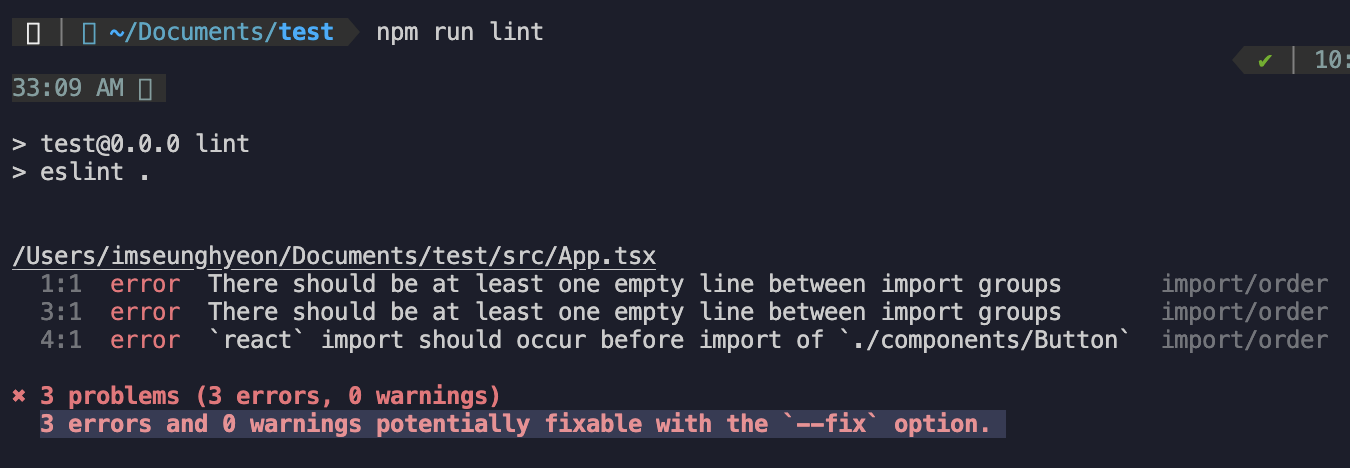
- 메시지와 같이 --fix를 사용해 import 규칙을 자동으로 정렬하게 할 수 있습니다.
npm run lint -- --fix
- package.json 파일의 “scripts”에 해당 명령어를 추가하거나, npm run dev 시에 위 명령어를 추가해 자동으로 정렬되게 설정할 수 있습니다.
"scripts": {
"lint:fix": "eslint . --fix",
"lint:fix": "eslint . --ext .ts,.tsx --fix"
}
npm run lint:fix
- 이제 ESLint를 활용해 import 순서를 자동으로 정리하고, 일관된 코드 스타일을 유지할 수 있습니다.
- 처음 설정하는 과정이 조금 번거로울 수 있지만, 한번 적용해두면 팀원 간 코드 스타일을 통일하고, 유지보수성을 높이는 데 큰 도움이 될 것 같습니다.